
How does Coupler.io Calculate Accounts?
- What is an account?
- How is the accounts limit calculated?
- What happens if the accounts limit is reached?
- What to do if I reach the accounts limit?
- How to disable or delete accounts?
- How to check how many active accounts l have?
What is an account?
An account refers to a single advertising, analytics, or CRM account you can connect from any data source. For example, with the Active plan, you can connect up to 15 accounts across all your sources, such as 5 Google Ads accounts, 5 Facebook Ads accounts, and 5 Google Analytics accounts.
How is the accounts limit calculated?
Accounts are calculated differently depending on the source category. This section explains the counting methods for each type. Examples per each source category are available below the table.
| Source | Accounts Limit Calculation | Source Category |
|
| Airtable | Each Airtable source is counted as a unique account, regardless of whether it uses the same Shared URL or not. If the same link is used in multiple data flows or in multiple sources, it will still be counted as a separate account for each data flow or data source. |
1 Data Source = 1 Account |
|
| Asana | One set of credentials added in Coupler is counted as 1 unique account, regardless of how many data entities you wish to pull, how many dataflows you create, and how many data sources you create using this credential. Note: Adding duplicate credentials (even for the same Asana account) counts as a separate account. Make sure to reuse existing credentials instead of adding duplicates to optimize your usage. |
1 Source account credential added in Coupler = 1 Account |
|
| BigQuery | One set of credentials added in Coupler is counted as 1 unique account, regardless of how many data sets or tables you pull the data from, how many dataflows you create, and how many data sources you create using this credential. Note: Adding duplicate credentials (even for the same BigQuery Service account) counts as a separate account. Make sure to reuse existing credentials instead of adding duplicates to optimize your usage. |
1 Source account credential added in Coupler = 1 Account |
|
| Clockify | Each Clockify source is counted as a unique account, regardless of whether it uses the same API key or not. If the same key is used in multiple data flows or in multiple sources, it will still be counted as a separate account for each data flow or data source. |
1 Data Source = 1 Account |
|
| Coupler.io | Accounts do not apply to the native Coupler.io source. | N/A |
|
| CSV | Each CSV source is counted as a unique account, regardless of whether it uses the same CSV URL or not. If the same link is used in multiple data flows or in multiple sources, it will still be counted as a separate account for each data flow or data source. |
1 Data Source = 1 Account |
|
| Dropbox | One set of credentials added in Coupler is counted as 1 unique account, regardless of how many Files or Sheets you pull the data from, how many dataflows you create, and how many data sources you create using this credential. Note: Adding duplicate credentials (even for the same Dropbox account) counts as a separate account. Make sure to reuse existing credentials instead of adding duplicates to optimize your usage. |
1 Source account credential added in Coupler = 1 Account |
|
| Facebook Ads | Counts accounts by the number of ad accounts you use with each credential added in Coupler. It does not matter how many report types, how many dataflows you create, and how many data sources you create using this credential. Note: Adding duplicate credentials (even for the same Facebook account) counts as a separate account. Make sure to reuse existing credentials instead of adding duplicates to optimize your usage. |
1 Ad account selected in wizard = 1 Account |
|
| Facebook Page Insights | Counts accounts by the number of pages you use with each credential added in Coupler. It does not matter how many report types, how many dataflows you create, and how many data sources you create using this credential. Note: Adding duplicate credentials (even for the same Facebook account) counts as a separate account. Make sure to reuse existing credentials instead of adding duplicates to optimize your usage. |
1 Page selected in wizard = 1 Account |
|
| Facebook Public Data | One set of credentials added in Coupler is counted as 1 unique account, regardless of how many pages or report types you pull data from, how many dataflows you create, and how many data sources you create using this credential. Note: Adding duplicate credentials (even for the same Facebook account) counts as a separate account. Make sure to reuse existing credentials instead of adding duplicates to optimize your usage. |
1 Source account credential added in Coupler = 1 Account |
|
| GoHighLevel | One set of credentials added in Coupler is counted as 1 unique account, regardless of how many data entities you pull data from, how many dataflows you create, and how many data sources you create using this credential. Note: Adding duplicate credentials (even for the same Facebook account) counts as a separate account. Make sure to reuse existing credentials instead of adding duplicates to optimize your usage. |
1 Source account credential added in Coupler = 1 Account Note: You can only select 1 Sub-Account per 1 Source account credential |
|
| Google Ads | Counts accounts by the number of ad accounts you use with each credential added in Coupler. It does not matter how many report types, how many dataflows you create, and how many data sources you create using this credential. Note: Adding duplicate credentials (even for the same Google account) counts as a separate account. Make sure to reuse existing credentials instead of adding duplicates to optimize your usage. |
1 Ad account selected in wizard = 1 Account |
|
| Google Analytics 4 | Counts accounts by the number of properties you use with each credential added in Coupler. It does not matter how many dataflows you create, and how many data sources you create using this credential. Note: Adding duplicate credentials (even for the same Google account) counts as a separate account. Make sure to reuse existing credentials instead of adding duplicates to optimize your usage. |
1 Property selected in wizard = 1 Account |
|
| Google Business Profile | Counts accounts by the number of locations you use with each credential added in Coupler. It does not matter how many report types you use, how many dataflows you create, and how many data sources you create using this credential. Note: Adding duplicate credentials (even for the same Google account) counts as a separate account. Make sure to reuse existing credentials instead of adding duplicates to optimize your usage. |
1 Location selected in wizard = 1 Account |
|
| Google Calendar | Counts accounts by the number of calendars you use with each credential added in Coupler. It does not matter how many data entities you use, how many dataflows you create, and how many data sources you create using this credential. Note: Adding duplicate credentials (even for the same Google account) counts as a separate account. Make sure to reuse existing credentials instead of adding duplicates to optimize your usage. |
1 Calendar selected in wizard = 1 Account |
|
| Google Drive | One set of credentials added in Coupler is counted as 1 unique account, regardless of how many Files or Sheets you pull the data from, how many dataflows you create, and how many data sources you create using this credential. Note: Adding duplicate credentials (even for the same Google account) counts as a separate account. Make sure to reuse existing credentials instead of adding duplicates to optimize your usage. |
1 Source account credential added in Coupler = 1 Account |
|
| Google Forms | One set of credentials added in Coupler is counted as 1 unique account, regardless of how many data entities or form IDs you pull data from, how many dataflows you create, and how many data sources you create using this credential. Note: Adding duplicate credentials (even for the same Google account) counts as a separate account. Make sure to reuse existing credentials instead of adding duplicates to optimize your usage. |
1 Source account credential added in Coupler = 1 Account |
|
| Google PageSpeed Insights | One set of credentials added in Coupler is counted as 1 unique account, regardless of how many lighthouse categories, analysis strategies, or URLs to analyze you specify, how many dataflows you create, and how many data sources you create using this credential. Note: Adding duplicate credentials (even for the same API key) counts as a separate account. Make sure to reuse existing credentials instead of adding duplicates to optimize your usage. |
1 Source account credential added in Coupler = 1 Account |
|
| Google Search Console | Counts accounts by the number of sites you use with each credential added in Coupler. It does not matter how many report types you use, how many dataflows you create, and how many data sources you create using this credential. Note: Adding duplicate credentials (even for the same Google account) counts as a separate account. Make sure to reuse existing credentials instead of adding duplicates to optimize your usage. |
1 Site selected in wizard = 1 Account |
|
| Google Sheets | One set of credentials added in Coupler is counted as 1 unique account, regardless of how many Files or Sheets you pull the data from, how many dataflows you create, and how many data sources you create using this credential. Note: Adding duplicate credentials (even for the same Google account) counts as a separate account. Make sure to reuse existing credentials instead of adding duplicates to optimize your usage. |
1 Source account credential added in Coupler = 1 Account |
|
| Harvest | Counts accounts by the number of Harvest accounts you use with each credential added in Coupler. It does not matter how many data entities, how many dataflows you create, and how many data sources you create using this credential. Note: Adding duplicate credentials (even for the same Harvest account) counts as a separate account. Make sure to reuse existing credentials instead of adding duplicates to optimize your usage. |
1 Harvest account selected in wizard = 1 Account |
|
| HubSpot | One set of credentials added in Coupler is counted as 1 unique account, regardless of how many data entities you pull the data from, how many dataflows you create, and how many data sources you create using this credential. Note: Adding duplicate credentials (even for the same HubSpot account) counts as a separate account. Make sure to reuse existing credentials instead of adding duplicates to optimize your usage. |
1 Source account credential added in Coupler = 1 Account Note: You can only select 1 HubSpot Account per 1 Source account credential |
|
| Instagram Ads | Counts accounts by the number of ad accounts you use with each credential added in Coupler. It does not matter how many report types, how many dataflows you create, and how many data sources you create using this credential. Note: Adding duplicate credentials (even for the same Instagram account) counts as a separate account. Make sure to reuse existing credentials instead of adding duplicates to optimize your usage. |
1 Ad account selected in wizard = 1 Account |
|
| Instagram Insights | Counts accounts by the number of profiles you use with each credential added in Coupler. It does not matter how many report types, how many dataflows you create, and how many data sources you create using this credential. Note: Adding duplicate credentials (even for the same Instagram account) counts as a separate account. Make sure to reuse existing credentials instead of adding duplicates to optimize your usage. |
1 Profile selected in wizard = 1 Account |
|
| Instagram Public Data | One set of credentials added in Coupler is counted as 1 unique account, regardless of how many profiles or report types you pull data from, how many dataflows you create, and how many data sources you create using this credential. Note: Adding duplicate credentials (even for the same Instagram account) counts as a separate account. Make sure to reuse existing credentials instead of adding duplicates to optimize your usage. |
1 Source account credential added in Coupler = 1 Account |
|
| Jira | One set of credentials added in Coupler is counted as 1 unique account, regardless of how many data entities you pull data from, how many dataflows you create, and how many data sources you create using this credential. Note: Adding duplicate credentials (even for the same Jira account) counts as a separate account. Make sure to reuse existing credentials instead of adding duplicates to optimize your usage. |
1 Source account credential added in Coupler = 1 Account |
|
| Jira Issues (JQL) | Counts accounts by the number of sites you use with each credential added in Coupler. It does not matter how many dataflows you create, and how many data sources you create using this credential. Note: Adding duplicate credentials (even for the same Jira account) counts as a separate account. Make sure to reuse existing credentials instead of adding duplicates to optimize your usage. |
1 Site selected in wizard = 1 Account |
|
| JSON | Each JSON source is counted as a unique account, regardless of whether it uses the same JSON URL or not. If the same link is used in multiple data flows or in multiple sources, it will still be counted as a separate account for each data flow or data source. |
1 Data Source = 1 Account |
|
| Klaviyo | One set of credentials added in Coupler is counted as 1 unique account, regardless of how many data entities you pull data from, how many dataflows you create, and how many data sources you create using this credential. Note: Adding duplicate credentials (even for the same Klaviyo API key) counts as a separate account. Make sure to reuse existing credentials instead of adding duplicates to optimize your usage. |
1 Source account credential added in Coupler = 1 Account |
|
| LinkedIn Ads | Counts accounts by the number of ad accounts you use with each credential added in Coupler. It does not matter how many report types, how many dataflows you create, and how many data sources you create using this credential. Note: Adding duplicate credentials (even for the same LinkedIn account) counts as a separate account. Make sure to reuse existing credentials instead of adding duplicates to optimize your usage. |
1 Ad account selected in wizard = 1 Account |
|
| LinkedIn Company Pages | Counts accounts by the number of pages you use with each credential added in Coupler. It does not matter how many report types, how many dataflows you create, and how many data sources you create using this credential. Note: Adding duplicate credentials (even for the same LinkedIn account) counts as a separate account. Make sure to reuse existing credentials instead of adding duplicates to optimize your usage. |
1 Page selected in wizard = 1 Account |
|
| Mailchimp | One set of credentials added in Coupler is counted as 1 unique account, regardless of how many data entities you pull data from, how many dataflows you create, and how many data sources you create using this credential. Note: Adding duplicate credentials (even for the same Mailchimp account) counts as a separate account. Make sure to reuse existing credentials instead of adding duplicates to optimize your usage. |
1 Source account credential added in Coupler = 1 Account |
|
| Microsoft Ads (Bing Ads) | Counts accounts by the number of ad accounts you use with each credential added in Coupler. It does not matter how many report types, how many dataflows you create, and how many data sources you create using this credential. Note: Adding duplicate credentials (even for the same Microsoft account) counts as a separate account. Make sure to reuse existing credentials instead of adding duplicates to optimize your usage. |
1 Ad account selected in wizard = 1 Account |
|
| Microsoft Excel | One set of credentials added in Coupler is counted as 1 unique account, regardless of how many Files or Sheets you pull the data from, how many dataflows you create, and how many data sources you create using this credential. Note: Adding duplicate credentials (even for the same Microsoft account) counts as a separate account. Make sure to reuse existing credentials instead of adding duplicates to optimize your usage. |
1 Source account credential added in Coupler = 1 Account Note: Microsoft Excel shares account with OneDrive source |
|
| OneDrive | One set of credentials added in Coupler is counted as 1 unique account, regardless of how many Files or Sheets you pull the data from, how many dataflows you create, and how many data sources you create using this credential. Note: Adding duplicate credentials (even for the same Microsoft account) counts as a separate account. Make sure to reuse existing credentials instead of adding duplicates to optimize your usage. |
1 Source account credential added in Coupler = 1 Account Note: OneDrive shares account with Microsoft Excel source |
|
| Pinterest Ads | Counts accounts by the number of ad accounts you use with each credential added in Coupler. It does not matter how many report types, how many dataflows you create, and how many data sources you create using this credential. Note: Adding duplicate credentials (even for the same Pinterest account) counts as a separate account. Make sure to reuse existing credentials instead of adding duplicates to optimize your usage. |
1 Ad account selected in wizard = 1 Account |
|
| Pinterest Organic & Shopping | One set of credentials added in Coupler is counted as 1 unique account, regardless of how many data entities you pull data from, how many dataflows you create, and how many data sources you create using this credential. Note: Adding duplicate credentials (even for the same Pinterest account) counts as a separate account. Make sure to reuse existing credentials instead of adding duplicates to optimize your usage. |
1 Source account credential added in Coupler = 1 Account |
|
| Pipedrive | One set of credentials added in Coupler is counted as 1 unique account, regardless of how many schema or view you pull the data from, how many dataflows you create, and how many data sources you create using this credential. Note: Adding duplicate credentials (even for the same Pipedrive account) counts as a separate account. Make sure to reuse existing credentials instead of adding duplicates to optimize your usage. |
1 Source account credential added in Coupler = 1 Account |
|
| PostgreSQL | One set of credentials added in Coupler is counted as 1 unique account, regardless of how many schema or view you pull the data from, how many dataflows you create, and how many data sources you create using this credential. Note: Adding duplicate credentials (even for the same PostgreSQL server and credentials) counts as a separate account. Make sure to reuse existing credentials instead of adding duplicates to optimize your usage. |
1 Source account credential added in Coupler = 1 Account |
|
| QuickBooks | One set of credentials added in Coupler is counted as 1 unique account, regardless of how many data entities you pull data from, how many dataflows you create, and how many data sources you create using this credential. Note: Adding duplicate credentials (even for the same QuickBooks account) counts as a separate account. Make sure to reuse existing credentials instead of adding duplicates to optimize your usage. |
1 Source account credential added in Coupler = 1 Account Note: QBO shares account with QBO Reports source |
|
| QuickBooks Report | One set of credentials added in Coupler is counted as 1 unique account, regardless of how many reports you pull data from, how many dataflows you create, and how many data sources you create using this credential. Note: Adding duplicate credentials (even for the same QuickBooks account) counts as a separate account. Make sure to reuse existing credentials instead of adding duplicates to optimize your usage. |
1 Source account credential added in Coupler = 1 Account Note: QBO Report shares account with QBO source |
|
| Quora Ads | Counts accounts by the number of ad accounts you use with each credential added in Coupler. It does not matter how many report types, how many dataflows you create, and how many data sources you create using this credential. Note: Adding duplicate credentials (even for the same Quora account) counts as a separate account. Make sure to reuse existing credentials instead of adding duplicates to optimize your usage. |
1 Ad account selected in wizard = 1 Account |
|
| Salesforce | One set of credentials added in Coupler is counted as 1 unique account, regardless of how many data types you pull data from, how many dataflows you create, and how many data sources you create using this credential. Note: Adding duplicate credentials (even for the same Salesforce account) counts as a separate account. Make sure to reuse existing credentials instead of adding duplicates to optimize your usage. |
1 Source account credential added in Coupler = 1 Account |
|
| Shopify | One set of credentials added in Coupler is counted as 1 unique account, regardless of how many data entities you pull data from, how many dataflows you create, and how many data sources you create using this credential. Note: Adding duplicate credentials (even for the same Shopify store) counts as a separate account. Make sure to reuse existing credentials instead of adding duplicates to optimize your usage. |
1 Source account credential added in Coupler = 1 Account |
|
| Snapchat Ads | Counts accounts by the number of ad accounts you use with each credential added in Coupler. It does not matter how many report types, how many dataflows you create, and how many data sources you create using this credential. Note: Adding duplicate credentials (even for the same Snapchat account) counts as a separate account. Make sure to reuse existing credentials instead of adding duplicates to optimize your usage. |
1 Ad account selected in wizard = 1 Account |
|
| Tableau | One set of credentials added in Coupler is counted as 1 unique account, regardless of how many data entities you pull data from, how many dataflows you create, and how many data sources you create using this credential. Note: Adding duplicate credentials (even for the same Tableau access token) counts as a separate account. Make sure to reuse existing credentials instead of adding duplicates to optimize your usage. |
1 Source account credential added in Coupler = 1 Account |
|
| TikTok Ads | Counts accounts by the number of ad accounts you use with each credential added in Coupler. It does not matter how many report types, how many dataflows you create, and how many data sources you create using this credential. Note: Adding duplicate credentials (even for the same TikTok account) counts as a separate account. Make sure to reuse existing credentials instead of adding duplicates to optimize your usage. |
1 Ad account selected in wizard = 1 Account |
|
| TikTok Organic | One set of credentials added in Coupler is counted as 1 unique account, regardless of how many report types you pull data from, how many dataflows you create, and how many data sources you create using this credential. Note: Adding duplicate credentials (even for the same TikTok account) counts as a separate account. Make sure to reuse existing credentials instead of adding duplicates to optimize your usage. |
1 Source account credential added in Coupler = 1 Account |
|
| Trello | One set of credentials added in Coupler is counted as 1 unique account, regardless of how many report types you pull data from, how many dataflows you create, and how many data sources you create using this credential. Note: Adding duplicate credentials (even for the same Trello account) counts as a separate account. Make sure to reuse existing credentials instead of adding duplicates to optimize your usage. |
1 Source account credential added in Coupler = 1 Account |
|
| WooCommerce | One set of credentials added in Coupler is counted as 1 unique account, regardless of how many data entities you pull data from, how many dataflows you create, and how many data sources you create using this credential. Note: Adding duplicate credentials (even for the same WooCommerce store) counts as a separate account. Make sure to reuse existing credentials instead of adding duplicates to optimize your usage. |
1 Source account credential added in Coupler = 1 Account |
|
| X (Twitter) Ads | Counts accounts by the number of ad accounts you use with each credential added in Coupler. It does not matter how many report types, how many dataflows you create, and how many data sources you create using this credential. Note: Adding duplicate credentials (even for the same X account) counts as a separate account. Make sure to reuse existing credentials instead of adding duplicates to optimize your usage. |
1 Ad account selected in wizard = 1 Account |
|
| Xero | Counts accounts by the number of tenants you use with each credential added in Coupler. It does not matter how many data entities, how many dataflows you create, and how many data sources you create using this credential. Note: Adding duplicate credentials (even for the same LinkedIn account) counts as a separate account. Make sure to reuse existing credentials instead of adding duplicates to optimize your usage. |
1 Tenant selected in wizard = 1 Account Note: Xero shares account with Xero Reports source |
|
| Xero Reports | Counts accounts by the number of tenants you use with each credential added in Coupler. It does not matter how many data entities, how many dataflows you create, and how many data sources you create using this credential. Note: Adding duplicate credentials (even for the same LinkedIn account) counts as a separate account. Make sure to reuse existing credentials instead of adding duplicates to optimize your usage. |
1 Tenant selected in wizard = 1 Account Note: Xero Reports shares account with Xero source |
|
| YouTube | One set of credentials added in Coupler is counted as 1 unique account, regardless of how many data entities you pull data from, how many dataflows you create, and how many data sources you create using this credential. Note: Adding duplicate credentials (even for the same YouTube channel) counts as a separate account. Make sure to reuse existing credentials instead of adding duplicates to optimize your usage. |
1 Source account credential added in Coupler = 1 Account Note: You can only select 1 channel per 1 Source account credential. Read more about this here. |
|
Example Calculations per Source Category
URL/API key-based Sources
These sources count accounts per the number of URLs/API keys used across your entire organization.
Example Scenario for Airtable source:
- Scenario 1: An organization has 2 data flows with 4 total data sources:
- Data flow #1 has 2 sources:
- Source #1 is fetching data from URL1 >
counted as account #1 - Source #2 is fetching data from URL2 >
counted as account #2
- Source #1 is fetching data from URL1 >
- Data flow #1 has 2 sources:
- Source #1 is fetching data from URL3 >
counted as account #3 - Source #2 is fetching data from URL1 (same as Data Flow #1, Source #1) >
counted as account #4
- Source #1 is fetching data from URL3 >
- In total, the number of accounts counted in this organization is 4.
- Even though there are only 3 unique URLs (URL1, URL2, and URL3), 4 URLs are used in total across the whole organization, so all of them were counted independently.
- Data flow #1 has 2 sources:


Account-based Sources
These sources count accounts by the number of credentials added on the Source Accounts page.
Example Scenarios for Asana source:
- Scenario 1: An organization has 1 Asana account. They've added 1 Asana credential in Coupler:

- Data flow #1 has 2 sources:
- Source #1 is fetching data from the Users data entity using the Source Account 1 credential >
counted as account #1 - Source #2 is fetching data from the Tasks data entity using the Source Account 1 credential >
still counted as account #1
- Source #1 is fetching data from the Users data entity using the Source Account 1 credential >
- Data flow #2 has 2 sources:
- Source #1 is fetching data from the Users data entity using the Source Account 1 credential >
stillcounted as account #1 - Source #2 is fetching data from the Projects data entity using the Source Account 1 credential >
still counted as account #1
- Source #1 is fetching data from the Users data entity using the Source Account 1 credential >
- In total, the number of accounts counted in this organization is 1.
- No matter how many data flows, data sources, or data entities you use, as long as they all use the same credential added in Coupler, it counts as only one source account.
- Scenario 2: An organization has 1 Asana account. However, they've added the same Asana credentials twice in Coupler:
-
Data flow #1 has 2 sources:
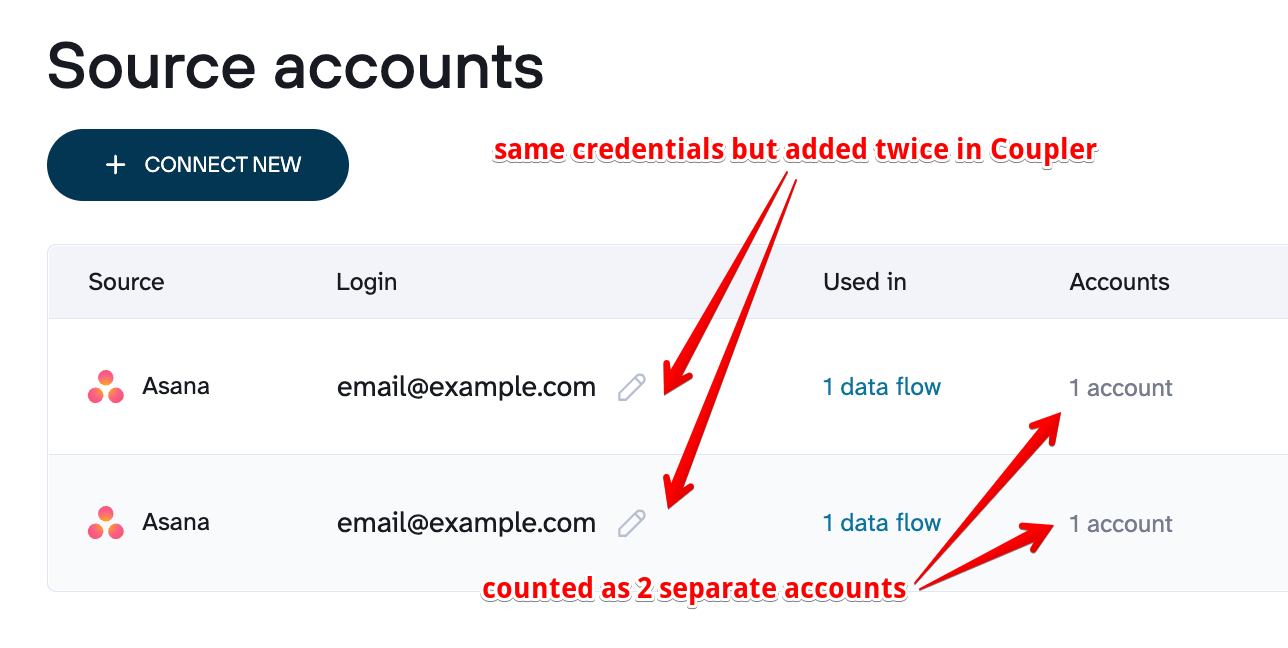
Source accounts page - Source #1 is fetching data from the Users data entity using the Source Account 1 credential >
counted as account #1 - Source #2 is fetching data from the Tasks data entity using the Source Account 2 credential >
counted as account #2
- Source #1 is fetching data from the Users data entity using the Source Account 1 credential >
- In total, the number of accounts counted in this organization is 2.
- Even though both credentials connect to the same external Asana account, they count as 2 separate source accounts in Coupler because they were added as separate credentials.
-


Tenant-based Source
These sources count accounts by the number of ad accounts, pages, property, location, calendar, site, profile, account, or tenant you select or use with the credentials added on the Source Accounts page. It is computed like this:
One source account credential added × Number of ad accounts, pages, property, location, calendar, site, profile, account, or tenant used = Total source accounts.
Example Scenarios for Facebook Ads source:
- Scenario 1: An organization has 1 Facebook account and access to 2 Ad accounts. They've added 1 Facebook Ads credential in Coupler. However, they fetched data for only 1 Ad account.
-
In total, the number of accounts counted in this organization is 1. Using the formula above:
One source account credential added × Number of ad accounts used = Total source accounts.
1 x 1 = 1
-


- Scenario 2: An organization has 1 Facebook account and access to 2 Ad accounts. They've added 1 Facebook Ads credential in Coupler:
- Data flow #1 has 2 sources:
- Source #1 is fetching data from the Reports and Insights report type using the Source Account 1 credential and selected ad account #1 >
counted as account #1 -
Source #2 is fetching data from the Reports and Insights report type using the Source Account 1 credential and selected ad account #2 >
counted as account #2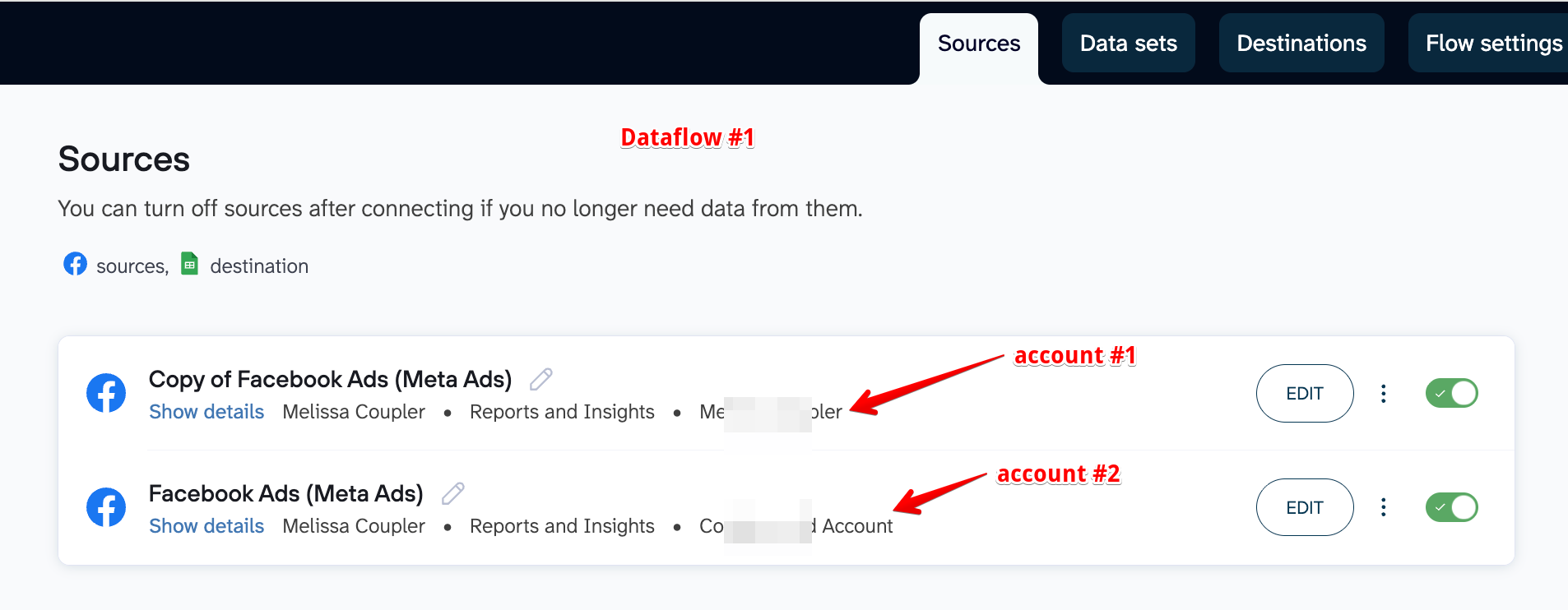
- Source #1 is fetching data from the Reports and Insights report type using the Source Account 1 credential and selected ad account #1 >
- Data flow #2 has 2 sources:
- Source #1 is fetching data from the Reports and Insights report type using the Source Account 1 credential and selected the same 2 ad accounts from Dataflow #1 >
still counted as accounts #1 and #2 -
Source #2 is fetching data from the List of Ads report type using the Source Account 1 credential and selected the same 2 ad accounts from Dataflow #1 >
still counted as accounts #1 and #2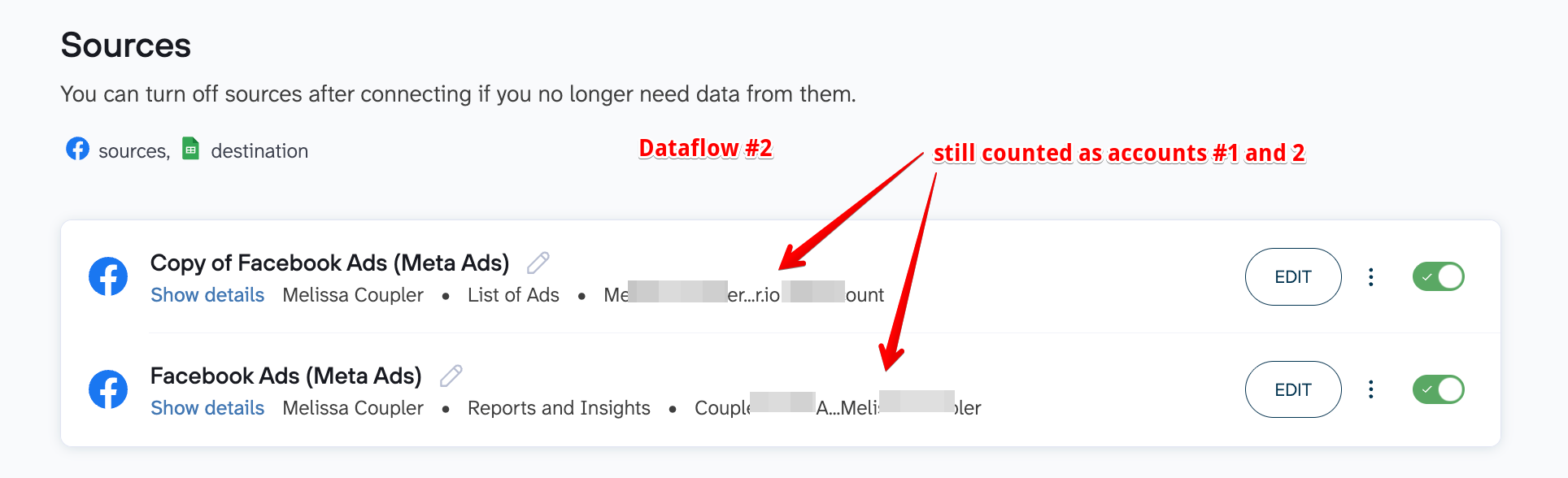
- Source #1 is fetching data from the Reports and Insights report type using the Source Account 1 credential and selected the same 2 ad accounts from Dataflow #1 >
-
In total, the number of accounts counted in this organization is 2. Using the formula above:
One source account credential added × Number of ad accounts used = Total source accounts.
1 x 2 = 2
-
No matter how many data flows, data sources, or data entities you use, we count only the number of ad accounts used for each credential in Coupler.
Scenario 3: An organization has 1 Facebook account and access to 2 Ad accounts. However, they've added the same Facebook Ads credentials twice in Coupler:
- Data flow #1 has 2 sources:
- Source #1 is fetching data from the Reports and Insights report type using the Source Account 1 credential and selected ad account #1 >
counted as account #1 -
Source #2 is fetching data from the Reports and Insights report type using the Source Account 1 credential and selected ad account #2 >
counted as account #2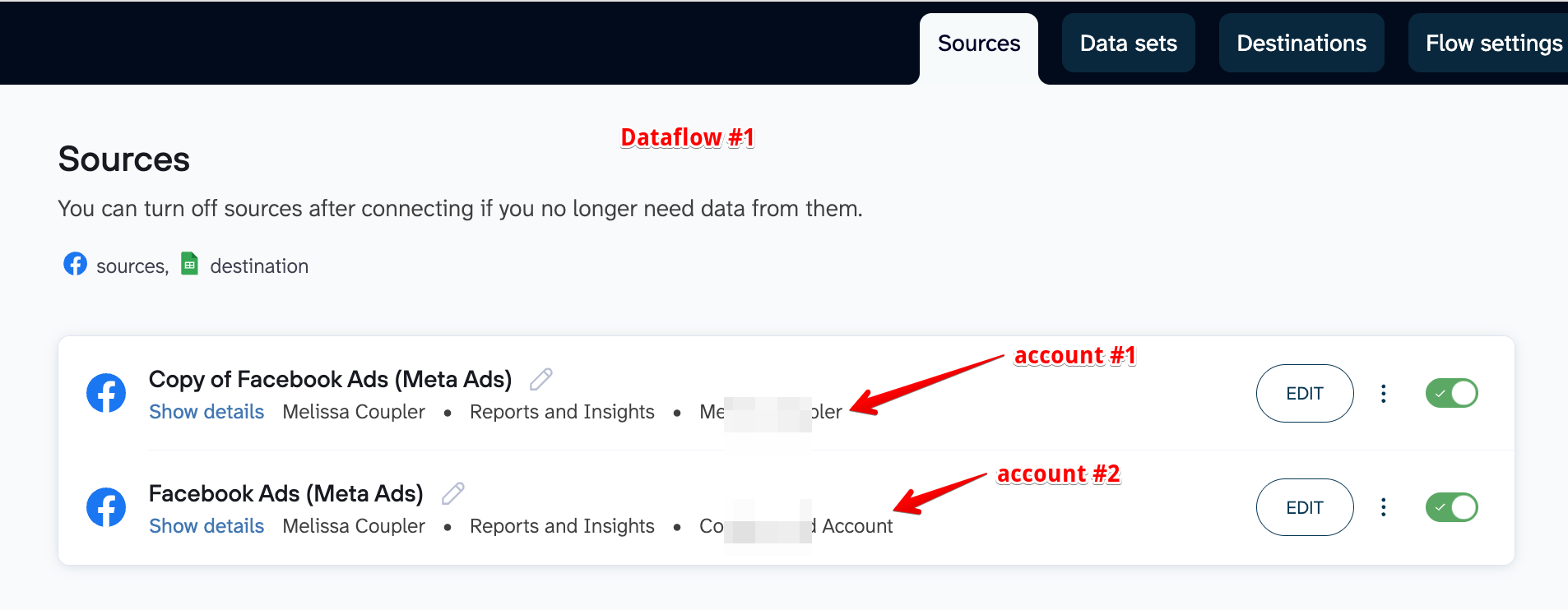
- Source #1 is fetching data from the Reports and Insights report type using the Source Account 1 credential and selected ad account #1 >
- Data flow #2 has 2 sources:
- Source #1 is fetching data from the Reports and Insights report type using the Source Account 2 credential and selected ad account #1 >
counted as account #3 -
Source #2 is fetching data from the Reports and Insights report type using the Source Account 1 credential and selected ad account #2 >
still counted as account #2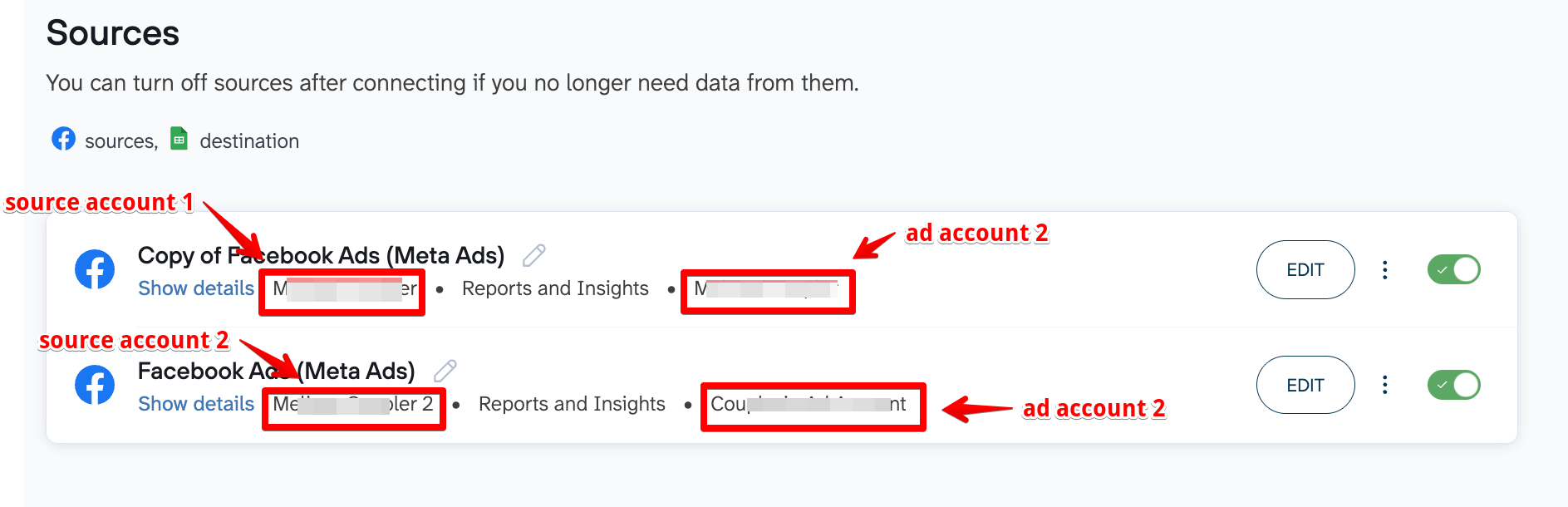
- Source #1 is fetching data from the Reports and Insights report type using the Source Account 2 credential and selected ad account #1 >
-
In total, the number of accounts counted in this organization is 3. Using the formula above:
One source account credential added × Number of ad accounts used = Total source accounts.
1 x 2 =2
+
1 x 1 = 1
Total: 2+1 = 3
- Even though both credentials connect to the same Facebook Ad Account, they are calculated separately because the credentials were added as separate entities in Coupler.
-
Also, notice that the dataflow #2 only uses Source Account 2's Ad Account #1 in this scenario. Since Ad Account #2 was not used, only 1 account is counted for that credential.
- Data flow #1 has 2 sources:
What happens if the accounts limit is reached?
Once you add the maximum number of accounts of your current billing plan, you will see the following warning:

And once you exceed the account limit and run a data flow, your data flows will fail with the following error:

What to do if I reach the accounts limit?
To continue running your data flows, you will need to:
- disable or delete some accounts until you're within your current plan's account limit, or
- upgrade to a plan with more accounts as needed, or
- contact the support team to buy additional accounts for your current plan (starting from the Starter plan tier). We have the following set of accounts add-ons that can be acquired: 10, 50, 100, 200, and custom for 500 plus.
How to disable or delete accounts?
URL/API key-based Source
- To disable this kind of source, you simply need to toggle off the source:

-
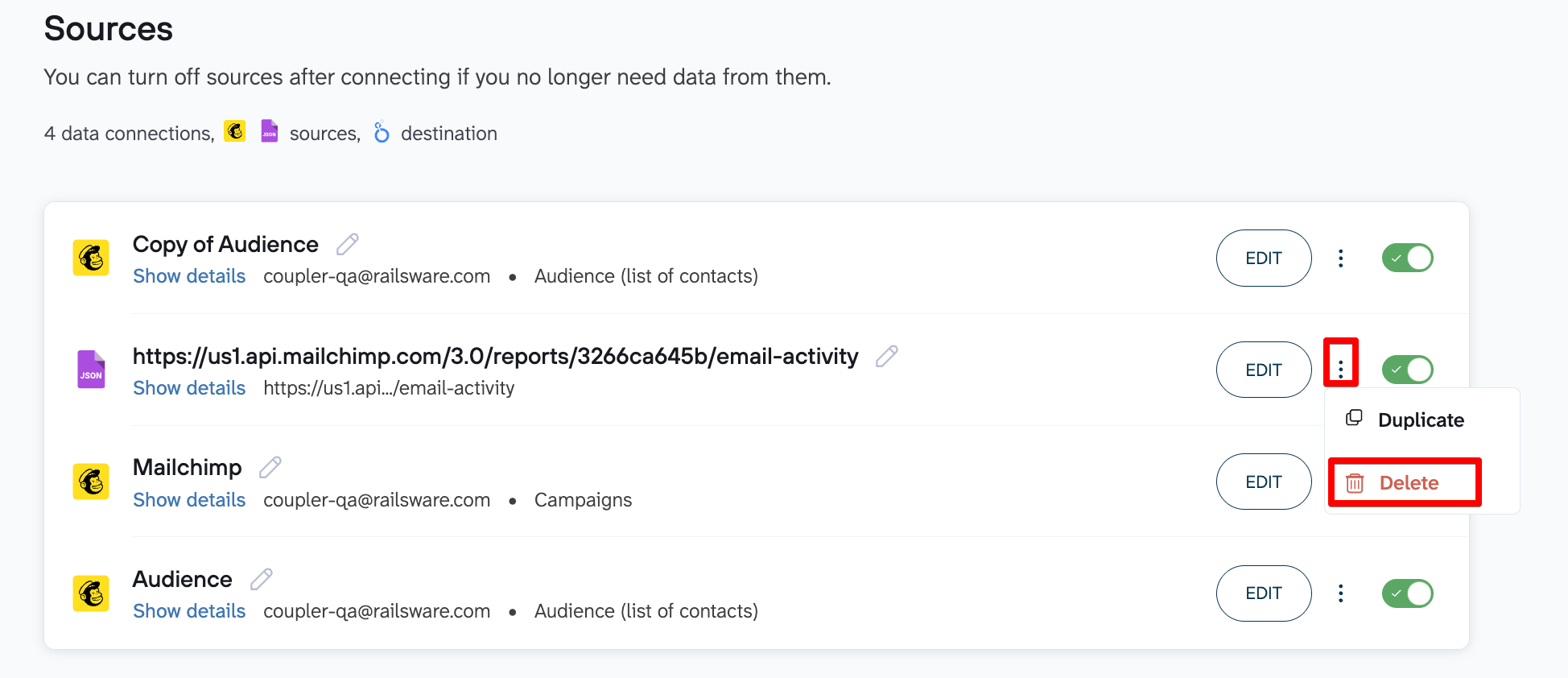
To delete it, you need to go to the menu on the right corresponding to the source you want to delete and click the delete button:
Account-based Source
-
To disable this kind of source, you need to toggle off all the sources that are using the Source account credential you added.
1. You can go to the Sources page and look for the Source you want to disable
2. From there, you can see how many data flows the Source Account is linked to. You can click the number of dataflows to show you which exact dataflows are using this credential:

3. Toggle off the source that is using this credential:

-
To delete it, you can simply delete the credential from the Sources page:

Tenant-based Source
- There is no way to disable these kinds of sources. You can only delete them.
-
To delete them:
1. You can go to the Sources page and look for the Source you want to disable
2. From there, you can see how many data flows the Source Account is linked to. You can click the number of dataflows to show you which exact dataflows are using this credential:

3. From the list of dataflows, you can check which dataflow has the account you want to delete.
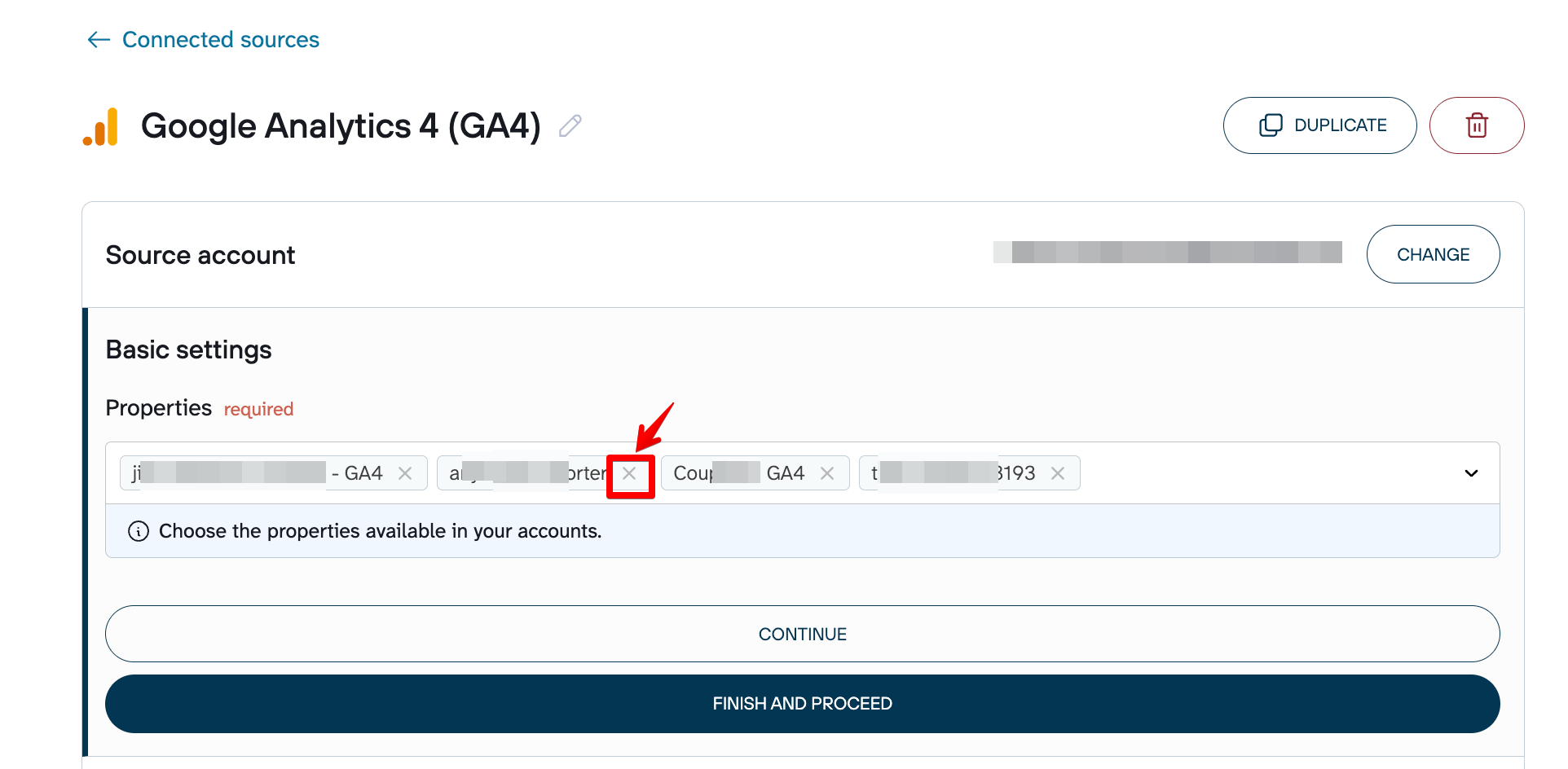
4. Delete the Ad/Page/Property/Location/Calendar/Site/Profile/Account/Tenant you want to delete:
How to check how many active accounts I have?
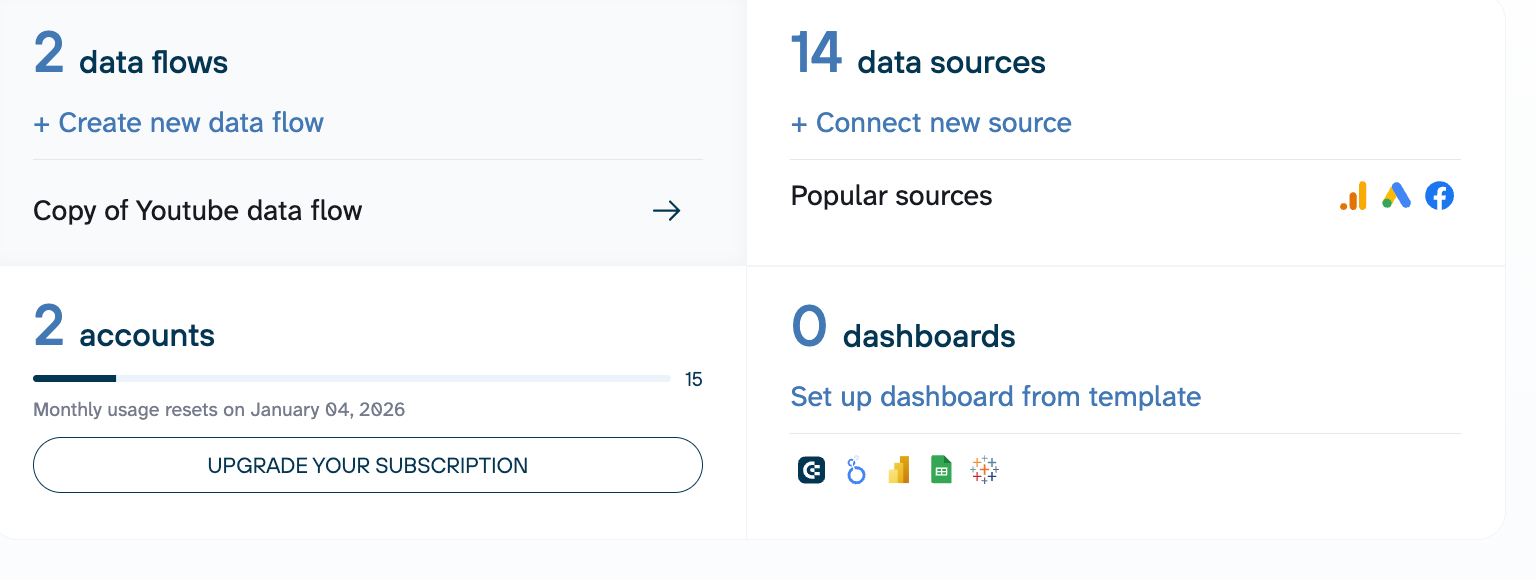
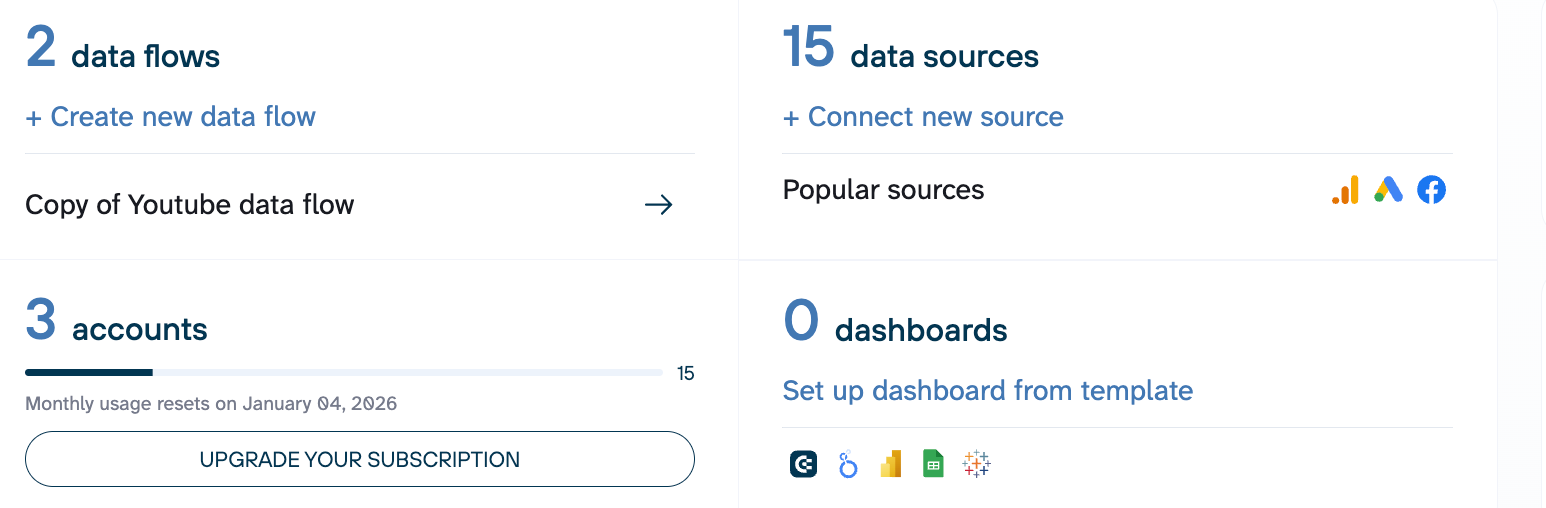
Navigate to the Settings > Billing Dashboard in your Coupler.io account or to the Home page.
The number of accounts you have used and how many you still have available are displayed under "Accounts" section:

