
How to create new Coupler.io organization?
You can create multiple organizations in Coupler.io — for example, to separate billing, teams, or projects.
Each organization has its own billing, settings, data flows, connections, and users.
Follow the steps below to add a new organization.
Requirements
Before creating a new organization, make sure you are a member of at least one paid organization. Organization creation is available only to users with an active paid subscription.
💁 Free-trial organizations cannot create new organizations. If you only have a trial org, the Add organization option will be disabled.
What happens when you create a new organization?
The new organization starts in a clean state. It is completely isolated from existing organizations:
- No data flows are copied
- No source or destination connections are copied
- No users are copied
- Only you (the creator) are added as the Organization Owner
ℹ️ New organizations start with a free 7-day trial, so you can prepare your setup before starting a paid plan.
How to Add a New Organization
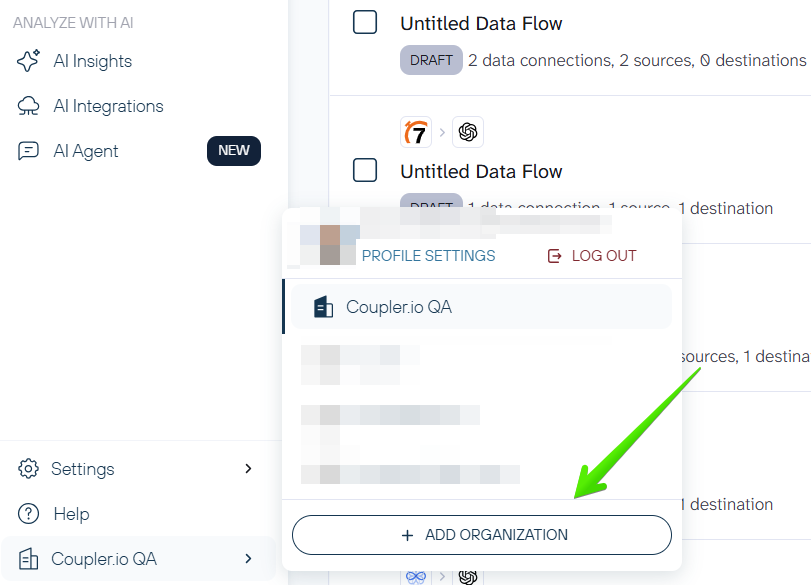
Step 1 - Open the organization switcher & Click “Add Organization”
Click your current organization name in the bottom-left corner of the sidebar to open the organization switcher.
At the bottom of the menu, select + Add Organization.
Step 2 - Enter the organization name & Confirm creation
A pop-up will appear. Enter the name of your new organization.
Click Add New to create your organization.
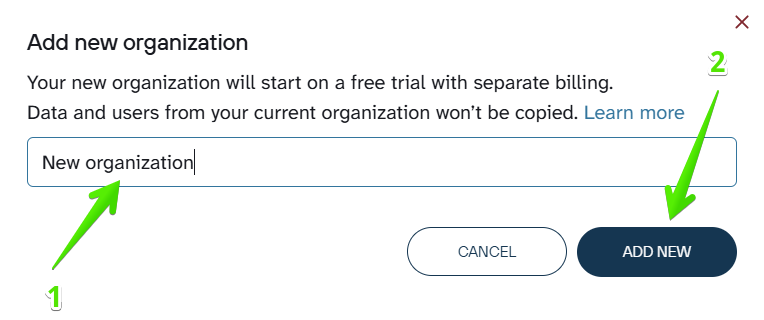
🙌 You’ll be automatically switched to the new organization.
FAQ
What happens with my organizations if I downgrade to the Free plan or leave all paid organizations?
You will no longer be able to create new organizations, but all organizations you created earlier will remain available. You keep access to them; nothing is removed.
Is there a limit on how many organizations I can have?
There is no limit. You can create an unlimited number of organizations (as long as you meet the creation requirements).